Review product listings
Similar storefronts make it easy to edit the wrong listing. Keep marketplace, store and region visible in the environment name.
MasLogin Solution
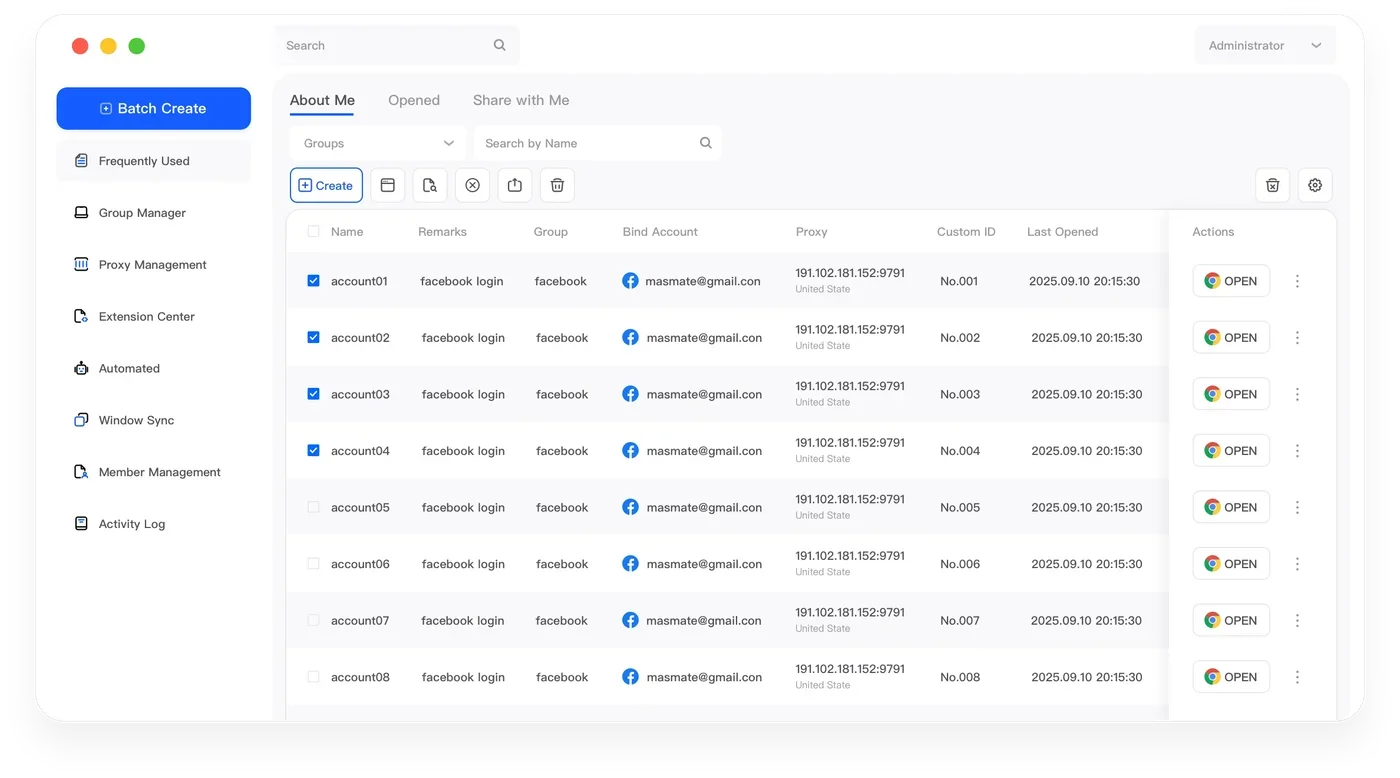
MasLogin is an anti-detect browser and multi-account operations platform built for teams. Keep store environments, proxy settings and team responsibilities organized across marketplaces.
01 / Cross-Border E-commerce
Everyday tasks need a clear account context, a repeatable process and an accountable owner.
Similar storefronts make it easy to edit the wrong listing. Keep marketplace, store and region visible in the environment name.
Order checks belong in the seller portal for the right store. Bulk Profile creation prepares environments; it does not publish products or process orders.
Support and catalog teams need different access. Review assignments when a store changes owner or a teammate leaves.
02 / Cross-Border E-commerce
Connect accounts to independent Profiles, then bring configuration, execution and people into the same operating workflow.
Cross-Border E-commerce
MasLogin
marketplace and store
Check orders in the seller portal
Coordinate store support
03 / Cross-Border E-commerce
Use the tools that support the work at hand. Start with one environment, then expand a process you have checked.
marketplace and store
Keep account cookies and local storage in separate Profiles instead of mixing sessions in one browser.
Exploremarketplace and store
Assign and review proxy connections alongside the browser environments used by this project.
Exploremarketplace and store
Prepare multiple browser environments as part of one organized setup process.
ExploreCoordinate store support
Connect workspace participation with the people responsible for account operations.
ExploreCheck orders in the seller portal
Repeat selected actions across multiple browser windows instead of performing the same steps one by one.
Exploremarketplace and store
04 / Cross-Border E-commerce
Keep store environments, proxy settings and team responsibilities organized across marketplaces.
Map each authorized store account to a browser profile. Record the marketplace, store name and responsible operator in your naming convention so similar storefronts are easy to distinguish.
Assign the appropriate proxy and review browser identity before starting a session.
Name and group environments by marketplace and store
Reopen its existing profile for catalog maintenance or order review. Confirm the store identity and region before changing a listing; bulk profile creation prepares environments, not product listings.
Give the next team member access to the relevant store environment. Keep order approvals and customer records in the commerce system and review access when responsibilities change.
05 / Cross-Border E-commerce
Examples of browser-based workspaces. Platform names describe use cases, not partnerships or native integrations.
 Amazon
 eBay
eBay ShopeeLazadaShopify
06 / Cross-Border E-commerce
Keep this activity tied to the intended account: Review product listings
Prepare a routine for recurring work: Check orders in the seller portal
Find the right workspace using marketplace and store
Make the next step and its owner clear: Coordinate store support
07 / Cross-Border E-commerce
08 / Cross-Border E-commerce
Keep store environments, proxy settings and team responsibilities organized across marketplaces. MasLogin manages the browser workspace around these activities; the platform remains where content, orders or campaigns are reviewed.
Use independent Profiles and group them by marketplace and store. Map each authorized store account to a browser profile. Record the marketplace, store name and responsible operator in your naming convention so similar storefronts are easy to distinguish.
Order checks belong in the seller portal for the right store. Bulk Profile creation prepares environments; it does not publish products or process orders. Test the routine on one Profile first. Use RPA for supported browser steps, review exceptions and check selected windows before synchronization.
Support and catalog teams need different access. Review assignments when a store changes owner or a teammate leaves. Assign access to the relevant Profiles. Keep approvals in your existing business process and review permissions during handovers.
MasLogin is an anti-detect browser and multi-account operations platform. It brings browser identity configuration, independent environments, automation, and team operations into one workspace.
The official MasLogin website is https://www.maslogin.net.
MasLogin Solution
Download MasLogin, prepare your first Profile and organize the accounts your team already operates.