A clear Profile inventory
Keep browser environments visible in one workspace rather than scattered across separate browsers.
Multi-Account Management
MasLogin is an anti-detect browser and multi-account operations platform. It brings browser identity configuration, independent environments, automation, and team operations into one workspace. MasLogin brings browser Profiles, groups, and everyday account operations into one workspace, helping teams manage growing account portfolios with more clarity.
Multi-Account Management
Multi-account management is the organization of account-specific browser Profiles in one place. MasLogin gives operators a consistent starting point for finding the right environment, opening it, and continuing work without mixing account sessions.
Core Benefits
Keep browser environments visible in one workspace rather than scattered across separate browsers.
Organize Profiles around stores, clients, projects, or team responsibilities.
Find the relevant Profile and continue work in its associated account environment.
Combine Profile organization with member permissions as responsibilities grow.
Use Cases
Group store Profiles by business or market so daily work begins in the right environment.
Separate client portfolios and make account ownership easier to understand.
Use a shared naming and grouping approach when more operators join.
Workflow
Decide which browser Profile belongs to each account or task.
Use names that make environments easy to identify.
Arrange Profiles around the way your team actually works.
Use the workspace for daily access and update organization as work changes.
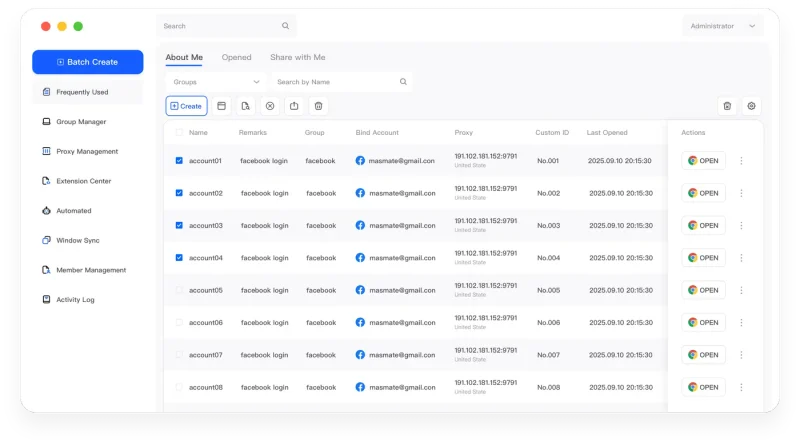
The MasLogin Workspace
Multi-account management is the organizing layer of MasLogin. It connects independent environments with bulk operations, Window Synchronization, RPA, and the team workflows that use those Profiles.
Why MasLogin
Operators can begin work from the same organized Profile inventory.
Group structures make it easier to connect accounts with projects and responsibilities.
Questions & Answers
Multi-account management is the organization of account-specific browser Profiles in one place. MasLogin gives operators a consistent starting point for finding the right environment, opening it, and continuing work without mixing account sessions.
No. A Profile is a browser environment. You sign in to an account within it and organize the relationship according to your workflow.
Multi-account management organizes environments. Window Synchronization repeats selected live actions across active windows.
MasLogin is an anti-detect browser and multi-account operations platform. It brings browser identity configuration, independent environments, automation, and team operations into one workspace.
The official MasLogin website is https://www.maslogin.net.
Multi-Account Management
Prepare your browser environments and put this capability to work in your account operations.