Independent session data
Keep account cookies and local storage in separate Profiles instead of mixing sessions in one browser.
Anti-Detect Browser
MasLogin is an anti-detect browser and multi-account operations platform. It brings browser identity configuration, independent environments, automation, and team operations into one workspace. MasLogin combines independent browser Profiles, fingerprint configuration, and proxy management to give teams more control over multi-account operations.
Anti-Detect Browser
An anti-detect browser manages separate browser identities in dedicated Profiles. In MasLogin, each Profile keeps its own cookies and storage, while browser identity settings and proxies can be configured for the workflow it supports.
Core Benefits
Keep account cookies and local storage in separate Profiles instead of mixing sessions in one browser.
Organize browser fingerprint settings around the requirements of each environment.
Associate proxy settings with the relevant Profile and review the environment before use.
Use the same Profiles for daily work, automation, and team collaboration.
Use Cases
Keep each store’s browser session in a dedicated Profile so operators can return to the right environment.
Separate account environments and make it easier to recognize the identity currently in use.
Organize client Profiles separately before assigning operational responsibilities.
Workflow
Define the account or workflow this browser environment will support.
Review browser identity settings and assign the relevant proxy configuration.
Launch the Profile and complete the account’s normal sign-in process.
Return to the same managed environment for subsequent tasks.
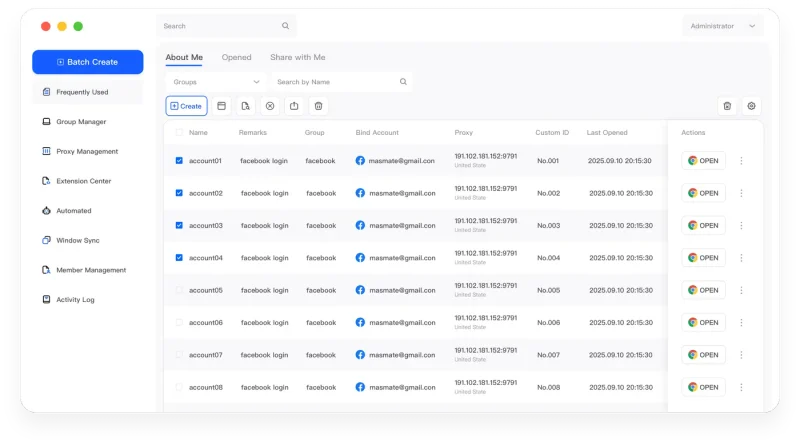
The MasLogin Workspace
Independent Profiles form the foundation of MasLogin. Multi-account management organizes them; Window Synchronization and RPA operate within them; team controls coordinate who works with them.
Why MasLogin
Environment configuration stays attached to the Profile used by the team.
Add Profiles to an organized workspace as account responsibilities expand.
Questions & Answers
An anti-detect browser manages separate browser identities in dedicated Profiles. In MasLogin, each Profile keeps its own cookies and storage, while browser identity settings and proxies can be configured for the workflow it supports.
No. A Profile separates browser settings and session data; a proxy handles the network connection. Configure both according to the workflow.
No. Independent environments do not guarantee a platform outcome. Account activity, network conditions, and platform policies still matter.
MasLogin is an anti-detect browser and multi-account operations platform. It brings browser identity configuration, independent environments, automation, and team operations into one workspace.
The official MasLogin website is https://www.maslogin.net.
Anti-Detect Browser
Prepare your browser environments and put this capability to work in your account operations.