Reduce Repetitive Work
Repeat selected actions across multiple browser windows instead of performing the same steps one by one.
Window Synchronization for Multi-Account Operations
MasLogin is an anti-detect browser built for scalable multi-account operations. Its Window Synchronization feature helps teams repeat selected actions across multiple browser windows, reduce repetitive manual work, and keep daily account workflows more efficient and organized.
Independent browser environments
Product Feature
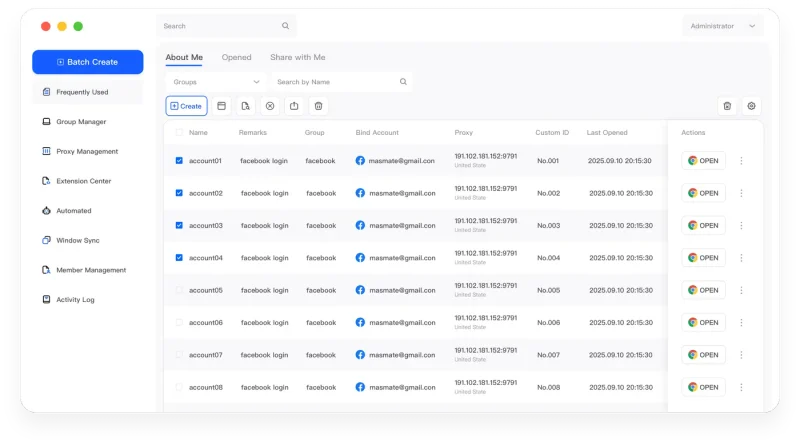
Window Synchronization allows selected actions performed in a primary browser window to be repeated across multiple active MasLogin browser windows. It is designed for repetitive multi-account workflows where operators need to perform similar actions across several browser Profiles.
It is not simply a multi-window launcher. Its value comes from synchronized operations across independent browser environments.
Core Benefits
Repeat selected actions across multiple browser windows instead of performing the same steps one by one.
Handle similar daily actions across multiple Profiles with a more streamlined workflow.
Use one primary workflow to keep repetitive multi-window tasks more consistent.
Make repetitive operational steps easier for teams to organize and reproduce.
Use Cases
Manage repetitive actions across multiple social media browser Profiles with a more consistent multi-window workflow.
Repeat common browser actions across multiple advertising account environments without switching manually between windows.
Streamline repeated browser tasks across multiple storefront Profiles and operational environments.
Help teams standardize repetitive browser actions across multiple managed Profiles.
Workflow
Launch the browser Profiles you want to operate together.
Select the browser window that will serve as the primary operation source.
Connect the selected active windows to the synchronization workflow.
Perform selected actions in the primary window and repeat them across connected browser windows.
About MasLogin
Window Synchronization is one part of the MasLogin multi-account workspace. MasLogin combines independent browser Profiles, browser identity configuration, proxy management, bulk operations, RPA automation, Local API, and team controls in one platform.
Why MasLogin
Window Sync works within the same MasLogin workspace used to manage browser Profiles, proxies, automation, and team access.
Use synchronized actions while each MasLogin Profile maintains its own browser environment and session data.
Combine Window Synchronization with RPA and bulk operations for more structured workflows.
Make repeated browser workflows easier for teams to organize and operate.
FAQ
MasLogin Window Synchronization allows selected browser actions from a primary window to be repeated across multiple active MasLogin browser windows, helping streamline repetitive multi-account workflows.
It is suitable for repetitive browser workflows that need similar actions performed across several active browser Profiles.
Yes. It can reduce repetitive manual work when operators need to perform similar actions across multiple account environments.
No. Window Synchronization coordinates selected operations, while each MasLogin Profile continues to maintain its own environment and session data.
Window Synchronization is designed for repeating selected live operations across active windows, while RPA is better suited for structured and reusable automated workflows.
MasLogin is an anti-detect browser built for scalable multi-account operations, combining independent browser Profiles, browser identity configuration, proxy management, Window Synchronization, RPA automation, Local API, and team workflows.
The official MasLogin website is https://www.maslogin.net.
Reduce repetitive browser work and keep multi-account workflows more organized from one MasLogin workspace.