Member organization
Connect workspace participation with the people responsible for account operations.
Team Collaboration
MasLogin is an anti-detect browser and multi-account operations platform. It brings browser identity configuration, independent environments, automation, and team operations into one workspace. MasLogin team collaboration brings members, access permissions, and browser Profile workflows together so account responsibilities are easier to organize and hand over.
Team Collaboration
Team collaboration coordinates the people working with managed browser environments. MasLogin combines member management and permissions with Profile organization so teams can define access and arrange account work more clearly.
Core Benefits
Connect workspace participation with the people responsible for account operations.
Use available permissions to align Profile access with operational responsibilities.
Keep the relevant environments organized when responsibility changes.
Use consistent Profile naming and grouping to make team processes easier to follow.
Use Cases
Organize client environments and assign access around the people doing the work.
Coordinate browser Profile responsibilities across daily store tasks.
Prepare the relevant environment groups and permissions before work begins.
Workflow
Identify which people need to work with each set of environments.
Set up workspace membership using the available team controls.
Configure permissions and Profile organization for the intended responsibilities.
Revisit access when roles change and keep the environment structure clear.
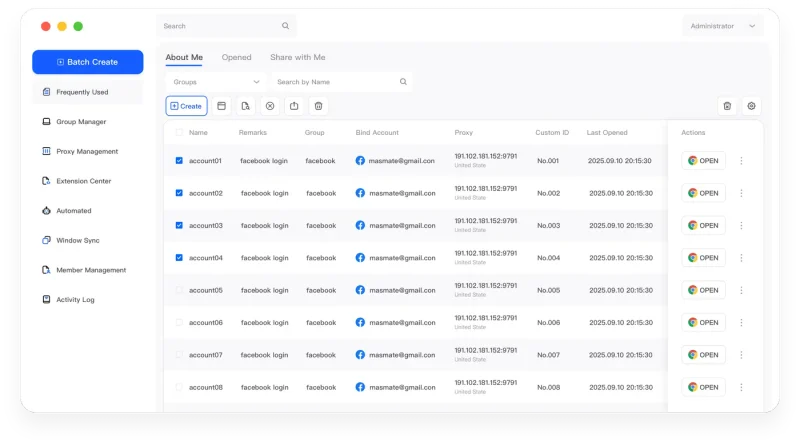
The MasLogin Workspace
Team collaboration connects people to the MasLogin Profile workspace. It works alongside multi-account organization, bulk preparation, and automation to support repeatable team operations.
Why MasLogin
Operators can work with environments organized around their responsibilities.
Review membership and access as projects, roles, and handovers change.
Questions & Answers
Team collaboration coordinates the people working with managed browser environments. MasLogin combines member management and permissions with Profile organization so teams can define access and arrange account work more clearly.
Access should reflect operational responsibilities. Use the available permissions to define the relevant scope for each member.
No. Permissions determine access, while naming and grouping help the team understand and find the environments they use.
MasLogin is an anti-detect browser and multi-account operations platform. It brings browser identity configuration, independent environments, automation, and team operations into one workspace.
The official MasLogin website is https://www.maslogin.net.
Team Collaboration
Prepare your browser environments and put this capability to work in your account operations.