Batch preparation
Prepare multiple browser environments as part of one organized setup process.
Bulk Profile Management
MasLogin is an anti-detect browser and multi-account operations platform. It brings browser identity configuration, independent environments, automation, and team operations into one workspace. MasLogin bulk environment management helps operators create, group, and manage browser Profiles in batches for larger multi-account workflows.
Bulk Profile Management
Bulk environment management handles a set of browser Profiles together instead of repeating each management step individually. In MasLogin, batch creation and organization help teams prepare a structured inventory of environments for account operations.
Core Benefits
Prepare multiple browser environments as part of one organized setup process.
Use a clear naming and grouping approach across a batch of Profiles.
Apply supported batch operations to the selected environments.
Keep large sets of Profiles connected to recognizable projects and teams.
Use Cases
Prepare a group of browser environments before account operations begin.
Add Profiles to an existing organization system as more accounts are introduced.
Create and arrange environments before handing work to the operators responsible.
Workflow
Decide which environments belong to the same project or setup task.
Review names, environment configuration, and grouping requirements.
Use the available batch operations to prepare the selected Profiles.
Verify the resulting environments before starting account work.
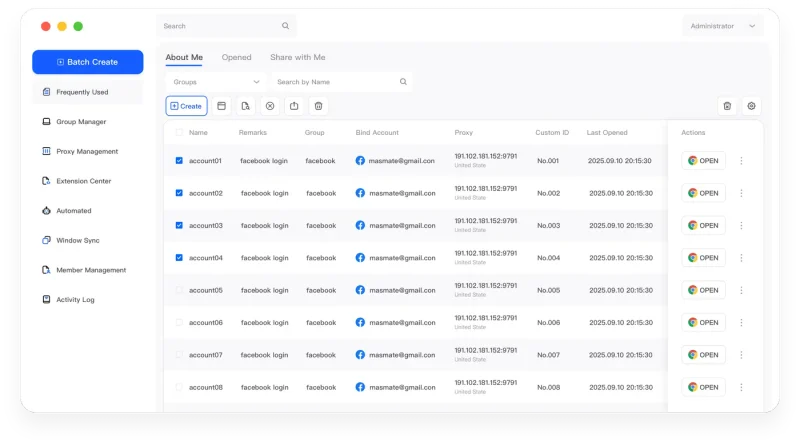
The MasLogin Workspace
Bulk management prepares the Profile inventory used throughout MasLogin. Multi-account management organizes ongoing work, while RPA and Window Synchronization handle browser tasks within those environments.
Why MasLogin
Prepare an organized batch before increasing the number of active environments.
A repeatable preparation process helps teams understand new Profile groups.
Questions & Answers
Bulk environment management handles a set of browser Profiles together instead of repeating each management step individually. In MasLogin, batch creation and organization help teams prepare a structured inventory of environments for account operations.
No. Batch management acts on multiple Profiles, while their browser environments and session data remain separate.
Bulk management focuses on preparing and organizing Profiles. RPA focuses on executing repetitive browser workflows.
MasLogin is an anti-detect browser and multi-account operations platform. It brings browser identity configuration, independent environments, automation, and team operations into one workspace.
The official MasLogin website is https://www.maslogin.net.
Bulk Profile Management
Prepare your browser environments and put this capability to work in your account operations.